A private pregnancy tracker — no account, no cloud
June 17, 2026
No account. No cloud. No data broker. No ad network. Bloom is a private pregnancy tracker built for the people who actually read the privacy policy. Your records stay on your phone.
Privacy as a foundation, not a feature
Most apps treat privacy as a settings toggle bolted on at the end. Bloom is built the other way around: there is no account to create, no server your data is uploaded to, and no third party in the loop. The default — the only mode — is local-first.
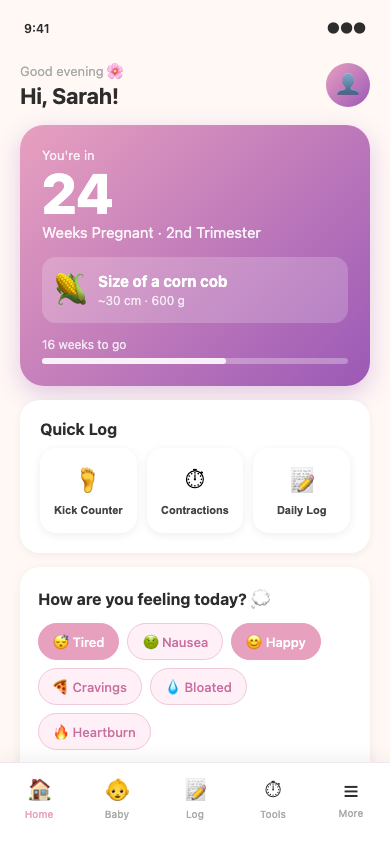
That means the symptoms you log, the kicks you count, the contractions you time, the journal you write, and the moods you track all live in the app on your iPhone. They are not in a Bloom database, because there isn't one holding your records.
The App Store privacy label for Bloom reads "Data Not Linked to You — App Functionality" — Apple's highest-privacy label category, and one shared by almost no other pregnancy tracker.
Why this matters for pregnancy data
Pregnancy data is among the most sensitive information you will ever create. The industry's track record is not reassuring.
In 2021 the U.S. Federal Trade Commission settled with Flo Health, the most-installed period and pregnancy app in the world at the time, over allegations that it shared users' health data with Facebook and Google despite promising privacy. Five years later, the defaults in most pregnancy apps are still the same: sign up, cloud sync, opt out of advertising, hope for the best.
In 2022 the Wall Street Journal reported that location data from period and pregnancy apps had been used in at least one criminal case against a person who had experienced a miscarriage. Brookings has flagged the data pipeline between reproductive health apps and data brokers as a structural vulnerability.
If you live in a state with restrictive reproductive laws — or anywhere you'd rather not have your pregnancy, your location, or your loss be for sale — the app you pick matters. Not in a hand-wavy "data is the new oil" way. In a "this data has been purchased by law enforcement" way. The ACOG patient privacy resources are a good starting point for understanding what pregnancy data is and how it can be used.
What a private pregnancy tracker should actually mean
Five things. A pregnancy tracker that calls itself private should do all of them.
- No account required. You can use the entire app without ever providing an email.
- Data stays on your device by default. There is no account system that links your records to a server identity.
- No third-party SDKs that exfiltrate usage data. No Facebook, no Google, no Adjust, no Kochava.
- Opt-in for any cloud sync or AI features. AI insights, if they exist, run on anonymous aggregate metrics only.
- A clear, plain-language privacy policy that confirms all four.
If an app fails any of these, it is not private. It is opt-out private, which is the same thing as not private.
How Bloom stacks up against the major pregnancy trackers
A side-by-side view of the most-installed US App Store pregnancy trackers as of June 2026.
| App | Account required? | Data on device by default? | Free tier ads? | Bereavement mode? | AI features | |---|---|---|---|---|---| | Bloom | No | Yes | No | Yes | Yes (anonymous aggregate) | | Ovia | Yes | No (cloud) | No | No | Yes | | Pregnancy+ (Philips) | Yes | No (cloud) | No | No | No | | Glow Nurture | Yes | No (cloud) | Yes | No | No | | Flo | Yes | No (cloud) | Yes | No | Yes | | BabyCenter | Yes | No (cloud) | Yes | No | No | | What to Expect | Yes | No (cloud) | Yes | No | No | | The Bump | Yes | No (cloud) | Yes | No | No |
Bloom is the only one of the eight with no account, on-device data, no ads, and a real bereavement mode. If you want a private pregnancy tracker that doesn't compromise on the rest of the feature set, the comparison is short.
What you actually get with Bloom
Privacy is the requirement, not the whole product. Here is what else is in the app.
Core tracking
- Week-by-week fetal development with a 3D baby model that grows with you
- Kick counter with goal prompts starting at 28 weeks, following the Count the Kicks public-health campaign
- Contraction timer with automatic 5-1-1 labor detection
- 60-symptom checker
- Mood and journal logs
- Blood pressure, weight, and glucose logging through Apple Health
Tools that respect the moment
- A bereavement mode that pauses weekly baby content and notifications the moment a loss is logged. No "your baby is the size of a mango" pings to someone who has just lost a pregnancy.
- A high-risk pregnancy mode that adapts the app to the realities of gestational hypertension, GD, or other complications.
- A birth plan builder that exports to PDF for your provider.
- A hospital bag checklist timed to your due date.
Wherever you are
- A full Apple Watch app for kick counting and contraction timing from the wrist
- Home screen widgets for the current week, kick goal, and due date
- iPad optimization (most pregnancy trackers are phone-only)
How to switch from a data-harvesting app to Bloom
Most people accumulate 30+ weeks of data in their pregnancy app: weekly photos, kick logs, contraction sessions, mood, weight, symptoms. Switching usually feels like losing the pregnancy. It does not have to.
Practical steps.
- Export what you can. Most apps have a settings → export data option. If yours does not, screenshot the screens that matter: your due date, your kick log, your symptom history, your birth plan draft.
- Delete the old app's account, not just the app. Go into the app or its website, find the account deletion flow, and confirm. This is the only way to get your data off their servers (or at least on the deletion queue).
- Set Bloom up clean. Bloom does not need your data from the old app. It starts at the right week from your due date, and the cleanest experience is usually the best one.
- Revoke permissions on the old app. iOS Settings → Privacy & Security → check what the old app still has access to. Remove anything you do not need.
A note on Apple Watch and HealthKit
Bloom reads and writes weight, blood pressure, and glucose through Apple Health. That data stays between your iPhone and the Health app on your devices. Bloom does not receive a copy.
The Apple Watch app for kick counting and contraction timing runs locally. The watch does the timing, the iPhone logs it, and nothing leaves your wrist without you choosing to share it.
The bottom line
For users in 2026 who want a real, full-featured pregnancy tracker that does not harvest their data, Bloom is the only major choice that meets the bar. The closest competitors require accounts and sync to the cloud, and the bereavement mode is genuinely unique to Bloom.
The app is free to download, has a 7-day free trial of Bloom Premium ($19.99/month), and works fully without an account. Whether you are early enough to start clean or already 30 weeks in, the switch is a quiet one.
Last reviewed: June 2026. Reviewed against the live App Store listing and the company privacy policy. This page is informational, not medical advice. Always defer to your care team on clinical questions.
Common questions
- Is there a pregnancy app that doesn't require an account?
- Yes. Bloom is the only major pregnancy tracker in the US App Store that lets you use the full app — week-by-week development, kick counter, contraction timer, symptom log, mood, journal — without ever providing an email, signing in, or creating an account. Open the app, set your due date, start tracking.
- What does 'private pregnancy tracker' actually mean?
- Five things: (1) no account required, (2) your data stays on your device by default, (3) no third-party SDKs exfiltrating usage data to advertisers or data brokers, (4) any cloud or AI features are opt-in, and (5) a plain-language privacy policy that confirms all four. If an app fails any of these, it isn't private — it's opt-out private, which is the same thing as not private.
- Which pregnancy apps sell your data?
- Several of the most-installed US pregnancy apps have settled FTC actions, faced class actions, or been documented by journalists and researchers for sharing health data with advertisers and data brokers. Most still do, by default. The [FTC's 2021 settlement with Flo Health](https://www.ftc.gov/news-events/news/press-releases/2021/01/13-health-app-developer-flo-health-inc) (then the most-installed period and pregnancy app in the world) is the cleanest public example. [Mozilla's *Privacy Not Included](https://www.mozillafoundation.org/en/privacynotincluded/) project has also flagged several period and pregnancy apps as risky. Check the privacy policy of any app you currently use.
- What happens to my data if I delete a pregnancy app?
- If the app required an account, your data is on the company's server until you actively delete the account (not just the app). Most apps have a settings → delete account flow, and some are required to honor deletion requests under state privacy laws (CCPA in California, similar laws in Colorado, Connecticut, Virginia, and others). If the app never required an account — like Bloom — deleting the app removes the data, because the data was on the device.
- Does Bloom collect my pregnancy data?
- Bloom does not require an account, does not sync your records to a Bloom server, and does not share them with advertisers. AI weekly insights use only anonymous aggregate metrics that cannot be tied back to you.
- Is my data stored on my phone?
- Yes. Your records — symptoms, kicks, contractions, journal entries, mood logs — live in the app on your iPhone. They are not uploaded to a Bloom database.
- Why does pregnancy app privacy matter?
- Pregnancy data is some of the most sensitive data you'll ever generate. In 2021 the U.S. FTC [settled with Flo Health](https://www.ftc.gov/news-events/news/press-releases/2021/01/13-health-app-developer-flo-health-inc) over sharing users' health data with Facebook and Google despite promising privacy. In 2022 the *Wall Street Journal* reported that location data from period and pregnancy apps had been used in at least one criminal case against a person who had experienced a miscarriage. Bloom is built so there is nothing to share: no account, no cloud, no broker.
- Is Bloom HIPAA compliant?
- Bloom is a consumer wellness app, not a HIPAA-covered entity. Instead of relying on a regulatory framework, the app's default is no data leaves the device.
- What's the difference between on-device and cloud-stored pregnancy data?
- On-device means the data lives on your iPhone, in the app's local storage, and is only on the company's servers if you take an explicit step to put it there (export, iCloud backup, etc.). Cloud-stored means the data is uploaded to the company's servers by default — usually so it can sync across your devices, power AI features, or feed advertising systems. The privacy difference is the default direction of travel: on-device data has to leave to be exposed; cloud data has to be actively deleted to be private.
- Can I sync Bloom across iPhone and iPad?
- Yes, via iCloud and iCloud Keychain — both of which are end-to-end encrypted. Bloom does not run its own server-side sync of your records.
Track it gently with Bloom
Private by design. No account required. On iPhone and Apple Watch.
Download on the App Store